Choosing the right scanner can make a big difference when you need clean text, accurate color, and minimal distortion. The best book and artwork scanners balance resolution, speed, and page handling for everything from sketchbooks to oversized prints.
Below, we focus on practical buying factors so you can pick a model that fits your workflow, whether you’re digitizing bound books, scanning artwork, or archiving important documents.
Best 10 Book and Artwork Scanners Picks for 2026
Portable Book Scanner
CZUR Shine Ultra Smart Portable Document Scanner, Thin Book

- About 1 second per page for A3/A4 scanning
- Patented flattening tech for thinner books
- 13MP camera with OCR in 180+ languages
Best For: Flat papers, thin books, and fast OCR scanning
Flatbed Document Scanner

- 2400 x 2400 dpi optical resolution
- Auto Scan mode simplifies operation
- Compact USB flatbed for flat documents
Best For: Flat documents, photos, and everyday scanning
High-Resolution Book Scanner
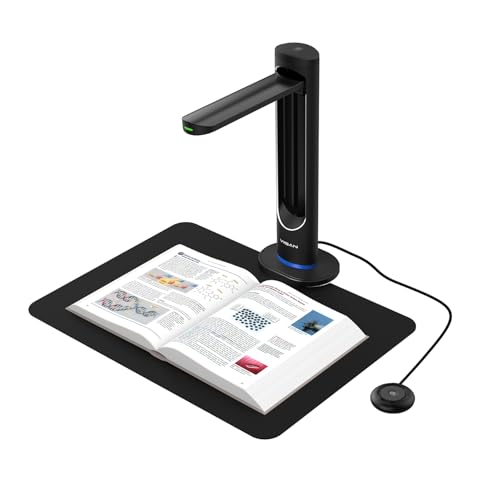
- 48MP sensor with 600 DPI capture
- AI page smoothing reduces curvature and shadows
- Laser positioning and auto-scan for fast workflows
Best For: Professional book digitization and archival OCR
A3 Flat Scanner
Plustek OS1180 Large Format Document Scanner

- Fits up to 11.7 x 17 inch A3/tabloid pages
- LED light source with no warm-up delay
- ABBYY OCR and file-sharing software included
Best For: A3 documents, charts, and large-format scanning
Compact Photo & Book Scanner

- 4800 dpi optical resolution for detailed scans
- High-rise removable lid helps scan books and albums
- USB-powered and lightweight at 3.1 lb
Best For: Compact home scanning of photos, books, and artwork
Large-Format Artwork Scanner

- 12 x 17-inch scan area for A3 and wide-format originals
- Handles large bound books, drawings, and maps
- Doc Action includes OCR and multiple file destinations
Best For: Oversized artwork, drawings, and large-bound books
Portable Handheld Book Scanner

- Portable handheld design weighs just 9.6 ounces
- Scans to JPEG or PDF with 300/600/900 dpi options
- Includes 16GB card and no software installation required
Best For: Quick mobile scans of books, receipts, and documents
Oversized flatbed pick

- A3 bed for books, artwork, and large documents
- 1200 dpi optical resolution with 48-bit color
- Fast 8-second scans and auto-scan convenience
Best For: Large flat originals in school, office, or creative workflows
Compact detail scanner

- 4800 dpi optical resolution for sharp scans
- Compact and USB-powered for easy placement
- High-rise removable lid supports books and documents
Best For: Portable home or office scanning with strong image detail
Overhead book scanner

- A3 overhead design for bound books and large pages
- 16MP camera with 300 DPI capture and OCR
- Anti-glare LEDs and auto page flattening aid readability
Best For: Bound books, archives, and oversized pages
Portable Book Scanner – CZUR Shine Ultra Smart Portable Document Scanner, Thin Book
If you want a fast book and artwork scanner for flat materials and thinner books, the CZUR Shine Ultra is built around speed, portability, and page-flattening software. It works as both a document camera and a scanner, so it suits desktop scanning, remote teaching, and OCR workflows.
Best For: Scanning flat papers, thin books, and A3-size materials with quick OCR capture.
Pros:
- About 1 second per page scanning for A3/A4 materials.
- Patented page-flattening technology helps reduce curved book-page distortion.
- 13MP CMOS camera with smart paging, auto cropping, and multiple color modes.
- Works with Windows and macOS, and supports OCR in 180+ languages.
Cons:
- Only suitable for thinner books; thicker books are better matched to the ET series.
- Not compatible with Android or iOS.
- Thai, Hebrew, and Arabic are not currently supported for OCR.
Overall, this is a practical choice if your priority is speed and flexible capture rather than heavy-duty book scanning. Its lightweight, foldable design makes it easy to move between desks, classrooms, and home offices.
Flatbed Document Scanner – Canon CanoScan LiDE 300
The Canon CanoScan LiDE 300 is a simple, compact option for people who need a dependable book and artwork scanner for documents, photos, receipts, and business cards. Its flatbed design and Auto Scan mode make it a straightforward choice when you want easy digitizing over advanced book-specific features.
Best For: Everyday document and photo scanning with a compact USB flatbed.
Pros:
- Auto Scan mode automatically detects what you’re scanning.
- 2400 x 2400 dpi optical resolution for detailed document and image capture.
- Compact USB-powered design with LED light source.
- Handles documents, photos, receipts, business cards, and paper.
Cons:
- Standard sheet capacity is just 1, so it is not built for batch feeding.
- Best suited to flat items rather than bound books or large-volume digitizing.
- Listed minimum system requirement is Windows 7.
If you mainly need a no-frills scanner for flat materials, this Canon model keeps things compact and easy to use. It is a sensible pick for home or small-office scanning where reliability matters more than specialized book-scanning features.
High-Resolution Book Scanner – VIISAN K48 48MP AI Scanner
For buyers comparing book and artwork scanners, the VIISAN K48 stands out for its 48MP sensor, 600 DPI capture, and AI-assisted page smoothing. It is designed for digitizing books, magazines, documents, and archival material with a focus on clarity, speed, and clean output.
Best For: High-detail book digitization, archiving, and OCR in professional or educational settings.
Pros:
- 48MP Sony CMOS sensor with 600 DPI capture for detailed scans.
- AI-assisted page smoothing helps flatten curved pages and reduce shadows.
- Laser positioning and auto-scan support fast, precise workflow.
- Multi-format OCR plus text-to-speech and 4K live view.
Cons:
- Requires Windows 10/11 or macOS 10.15+.
- USB 3.0 Type-C setup may be more than casual users need.
- Focused on scanning workflow rather than portability-first design.
This is a strong pick when scan quality and automation matter most. It is especially appealing for libraries, classrooms, and offices that need a capable digitization tool for books and reference materials.
A3 Flat Scanner – Plustek OS1180 Large Format Document Scanner
The Plustek OS1180 is a practical book and artwork scanner for A3-size documents, charts, and other large-format materials. Its flat scanner design, LED light source, and bundled OCR software make it a useful fit for libraries, schools, and small offices that need dependable large-page capture.
Best For: Scanning A3 documents, artwork, and large-format pages in educational or office settings.
Pros:
- Scans up to 11.7 x 17 inches, covering A3 and tabloid pages.
- LED light source means no warm-up wait.
- One-touch buttons and preset functions simplify routine scanning.
- Includes ABBYY FineReader 12 and other software for OCR and file sharing.
Cons:
- PC-only compatibility limits flexibility for mixed-device users.
- Single-sheet capacity means it is not built for high-volume feeding.
- Bulky compared with compact desktop scanners.
For oversized pages, this Plustek offers a straightforward flatbed approach with useful software support. It is a solid option if your workflow centers on large-format documents and occasional artwork scanning rather than portable use.
Compact Photo & Book Scanner – Epson Perfection V19 II
If you need a straightforward option for book and artwork scanners, the Epson Perfection V19 II focuses on detail, speed, and simple everyday use. Its 4800 dpi optical resolution is well suited to photos, illustrations, and artwork, while the high-rise removable lid makes it easier to scan books and photo albums without fighting the cover.
Best For: Home users and small offices that want a compact scanner for photos, artwork, books, and documents.
Pros:
- 4800 dpi optical resolution for sharp scans with fine detail
- High-rise, removable lid helps with books and photo albums
- Epson ScanSmart software supports photos, artwork, documents, and searchable PDFs
- USB-powered design keeps it compact and portable at 3.1 lb
Cons:
- Standard sheet capacity is just 1, so it is not built for batch feeding
- Best suited to flat originals rather than high-volume scanning jobs
- Requires a USB connection for power and use
This is a practical flatbed pick if you want clean results without a complicated setup. It is especially appealing for preserving books, old pictures, and artwork in a compact footprint.
Large-Format Artwork Scanner – Plustek OpticPro A320E
The Plustek OpticPro A320E is built for larger originals, making it a strong fit among book and artwork scanners when you need extra surface area. Its 12 x 17-inch scan area handles A3 paper, wide-format drawings, maps, and even large bound books, while CCD sensors are aimed at color scanning work.
Best For: Artists, archivists, and offices that need to scan oversized artwork, drawings, and large books.
Pros:
- Large 12 x 17-inch scan area supports A3 and wide-format originals
- Suitable for large bound books, drawings, maps, and odd-shaped articles
- Doc Action software supports scan-to-print, email, FTP, and OCR PDFs
- TWAIN/WIA support and Windows, Mac, and Linux compatibility add flexibility
Cons:
- Much larger and heavier than compact flatbed scanners
- Requires 30 watts, so it is less portable and more desk-bound
- Compatibility details vary by operating system and driver support
For oversized originals, this model offers the space and workflow tools that smaller scanners simply cannot match. It is a strong choice when scan area matters more than portability.
Portable Handheld Book Scanner – Hczrc A4 Portable Scanner
If portability matters most in book and artwork scanners, this handheld Hczrc model keeps the process simple. It scans to JPEG or PDF without software installation, stores files on the included memory card, and offers selectable 300, 600, or 900 dpi resolution for quick capture on the go.
Best For: Travelers, students, and mobile users who want a lightweight scanner for books, receipts, and documents.
Pros:
- Very lightweight at 9.6 ounces and easy to carry
- No software installation required for basic use
- JPEG and PDF output with 300/600/900 dpi options
- Includes a 16GB card and supports direct storage on micro SD
Cons:
- Handheld scanning is less consistent than a flatbed for precise artwork work
- Requires 2 AA batteries, which are not included
- Best suited to quick captures rather than archival-quality scanning
This is the most portable choice in the group, but it trades away the stability and detail control of a flatbed. It works best when convenience and speed matter more than perfection.
Oversized flatbed pick – VIISAN 3120 A3 Flatbed
If you need one of the more practical book and artwork scanners for oversized pages, the VIISAN 3120 is built for flat materials like books, magazines, photos, paintings, and CAD drawings. Its A3 bed and frameless design make it easier to handle larger documents, while the 1200 dpi optical resolution gives you room for detailed archiving and reprints.
Best For: Schools, small offices, libraries, and creators scanning large flat originals such as books, artwork, and posters.
Pros:
- A3 flatbed handles items up to 304 x 426 mm, including books and artwork
- 1200 x 1200 dpi optical resolution with 48-bit color depth
- Fast 8-second scan speed at 200 dpi for A3 color pages
- Auto-scan and four-panel buttons help streamline repetitive work
Cons:
- CIS sensor is not recommended for 3D items or curved materials
- WIA support is limited to 600 dpi
- 1200 dpi scanning requires the included ViiScan software
Overall, this is a capable oversized flatbed option if your workflow centers on flat books, artwork, and other large paper originals. It balances speed, detail, and simplicity, but it is best used within the scanner’s flat-material limits.
Compact detail scanner – Epson Perfection V39 II
The Epson Perfection V39 II is a compact choice among book and artwork scanners when you want strong detail without a bulky setup. Its 4800 dpi optical resolution is aimed at clear photo and image capture, and the removable high-rise lid makes it easier to scan books, artwork, documents, and other flat originals.
Best For: Home users, hobbyists, and small offices that want a lightweight scanner for photos, books, and artwork.
Pros:
- 4800 dpi optical resolution for detailed scans
- Compact, lightweight design that is easy to move and store
- High-rise removable lid helps with books and thicker items
- ScanSmart software supports stitching oversized images and cloud output
Cons:
- Standard sheet capacity is 1, so it is not built for batch feeding
- Letter-sized scans are listed as quick, but large-volume workflows will still be manual
- Designed for flat originals, not specialized capture of dimensional objects
For buyers who value portability and image detail, this scanner is a straightforward fit. It is especially useful for occasional book and artwork scanning where space-saving design matters more than production-speed throughput.
Overhead book scanner – VIISAN DL16 Book Scanner
If your priority is scanning bound volumes, archives, or large pages, the VIISAN DL16 stands out in the book and artwork scanners category as an overhead solution. Its 16MP camera, A3 capture area, and anti-glare LED lighting are designed to make it easier to digitize books, artwork, and other large documents that do not lay perfectly flat on a standard bed.
Best For: Libraries, educators, offices, and home archivists scanning bound books, oversized pages, and mixed paper collections.
Pros:
- Overhead A3 design is better suited to bound books and large pages
- 16MP camera with up to 300 DPI capture for clear document detail
- Anti-glare LED lighting helps reduce shadows and reflections
- OCR support and auto page flattening help with searchable workflows
Cons:
- 300 DPI resolution is lower than many flatbed scanners aimed at high-detail imaging
- USB-connected desktop setup is not meant for portable, on-the-go use
- Best suited to overhead capture rather than flatbed-style photo reproduction
This is a smart pick when bound materials are the main challenge. It is more specialized than a flatbed scanner, but that specialization is exactly what makes it useful for book digitizing, archives, and oversized originals.
How We Picked These Book and Artwork Scanners
We prioritized models that are useful for real-world scanning needs: sharp image capture, OCR support, larger scan areas, straightforward software, and formats that work for both bound pages and flat originals. We also considered portability, scan speed, and whether a scanner is better suited to books, photos, or artwork.
Quick Comparison
Overhead scanners are usually the best choice for bound books because they reduce spine stress and page curvature. Flatbed scanners are often better for artwork, photos, and documents that need even lighting and consistent focus. Portable and handheld scanners can be convenient, but they are typically best for lighter-duty jobs rather than high-fidelity archival work.
Key Buying Factors for Book and Artwork Scanners
Scan Type and Original Size
Look first at whether the scanner is overhead, flatbed, or portable. For larger art prints, maps, or oversized books, an A3-capable model gives you more flexibility. If you mainly scan standard pages, a compact flatbed may be enough.
Resolution and Image Quality
Higher optical resolution matters for artwork, fine print, and detailed linework. For books, OCR accuracy and clarity can be more important than raw megapixels. If color fidelity is a priority, choose a scanner known for reliable tonal reproduction and consistent illumination.
Book-Friendliness
The best Book and Artwork Scanners handle curved pages, shadows near the spine, and delicate bindings well. Features like page flattening, anti-glare lighting, and overhead capture can save time and improve results.
Workflow and Software
OCR, auto-detect, PDF output, and one-button scanning can streamline large projects. If you’re building an archive, check whether the scanner supports searchable PDFs, batch scanning, and easy file naming.
Who Should Buy Which Book and Artwork Scanners?
Choose an overhead or document-camera style scanner if you need to digitize books quickly without flattening the spine. Choose a flatbed scanner if you care most about photo and artwork quality, or if your originals need a stable, controlled scan surface. Choose a portable scanner if convenience matters more than precision and you mainly scan on the go.
If your work includes both reading materials and creative originals, a versatile A3-capable model is often the best compromise. For most buyers, the ideal choice comes down to whether speed, detail, or gentle handling is the top priority.